
GIS 4 Lecode
Geo-referenced Model Generation
Here you will find several workflows to generate topographic and stratigraphic input files to run your own Lecode simulations.
These workflows are built using IPython Notebook interactive environment.
A series of essential notebooks are available for download and present a step by step guide to generate the required nodes and deposits files used for Lecode initialisation.
We encourage you to start with these guides but to quickly develop your own functionalities based on these scripts.
There are many improvements that can always be made in either the codes shown in these workflows, or the explanation of a particular approach to something. If you find something broken, or stuck with an inadequate explanation, feel free to contact us so that we might correct it. Also do not hesitate to share your experience and notebooks with others by giving access through the Github repository to your workflows.
The standard scientific python stack is needed for having the SgFm Notebook working and are required before installing the specific packages listed below.
The easiest and preferred way to get all dependencies is using the Anaconda Python distribution by Continuum Analytics. It does not require administrative rights to your computer and doesn’t interfere with the Python installed in your system. For Windows users, it even comes with MinGW so you don’t have to worry about the many, many, many issues of compiling under Windows.
Once you have downloaded and installed Anaconda, open a terminal (or cmd.exe on Windows) and run:
conda install numpy scipy matplotlib basemap imaging mayavi pip
Then the following packages will need to be installed:
PyProj python interface to PROJ.4 library,
Basemap plot on map projections using matplotlib,
Gdal python bindings for Geospatial Data Abstraction Library (and OGR)
Shapely pythonic library for geometric tasks
Fiona pythonic interface to OGR data formats
Fatiando a geophysical modelling and inversion toolkit
The excellent compilation of materials and tutorial from Kelsey Jordahl "Using Geospatial Data With Python" (Jun 25, 2013, SciPy 2013 conference) is a nice guide and starting point to install and test your own IPython GIS environment.
In addition to the required packages you could also use the KingChaos Wiki from William Kyngesburye (if you are on Mac OS X) to install some additional packages such as GRASS to increase the capability of the IPython integrated environment.
For a general place to get started with geospatial work with Python, Erik Westra’s "Python Geospatial Development" is an excellent resource, and we strongly encourage users to take time to read some general materials on geospatial work before looking at specific datasets.
Before working with your own datasets, it is important to understand how things can be referenced geographically in particular you will need to know about:
Coordinate Systems (Unprojected vs Projected systems),
Earth’s Shape and Datums (Geographic Information Systems such as WGS84),
Map Projections specially about the Universal Transverse Mercator (UTM) projection which is used for Lecode input files transformation.
The Notebooks are developed to provide users with an easy interface to produce Lecode input files and are not a replacement of a proper GIS platform such as GRASS or QGIS. If you are already familiar with these tools you might be able to produce your Lecode input files without these notebooks.
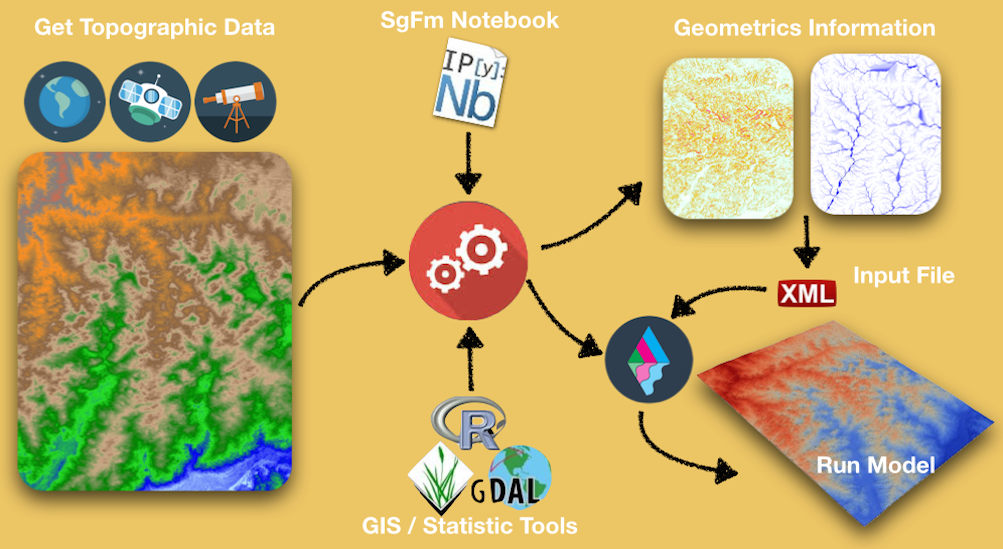
In a nutshell, the SgFm Notebooks will give you an easy interface to:
Apply a set of transformations to your geospatial data (merge tiles, project dataset to UTM),
Combine bathymetric and topographic datasets,
Clip your dataset to the area you want to simulate within Lecode,
Define the resolution of your simulation area as well as the initial geological layer, and
Determine Geo-metrics information such as flow accumulation and slope maps to define several parameters required in Lecode XmL input file.
In case you want to build a model using an uniform distribution of sediment classes over the all simulation area you can use the SGFMTopoGen_Basic.ipynb or SGFMTopoGen.ipynb notebooks. For these 2 notebooks, definition of the geology is not required and you will produce a initial Lecode model which will only conform with the dataset bathymetry and topography.
Lecode uses a regular orthogonal grid to store stratigraphic information through time and it is required that your input nodes definition are oriented in a E-W / S-N direction.
Follow the link below to have a look @ the IPython Notebook for basic topography/bathymetry generation.
In case your simulation area is not directly in these directions (rotated area in respect to UTM projection) the SGFMTopoGen.ipynb notebook needs to be used. This notebook will assist you in defining a new projection to rotate the map and to produce a regularly spaced grid based on the gridder facility from Fatiando library.
Follow the link below to have a look @ the IPython Notebooks for rotated topography/bathymetry generation.
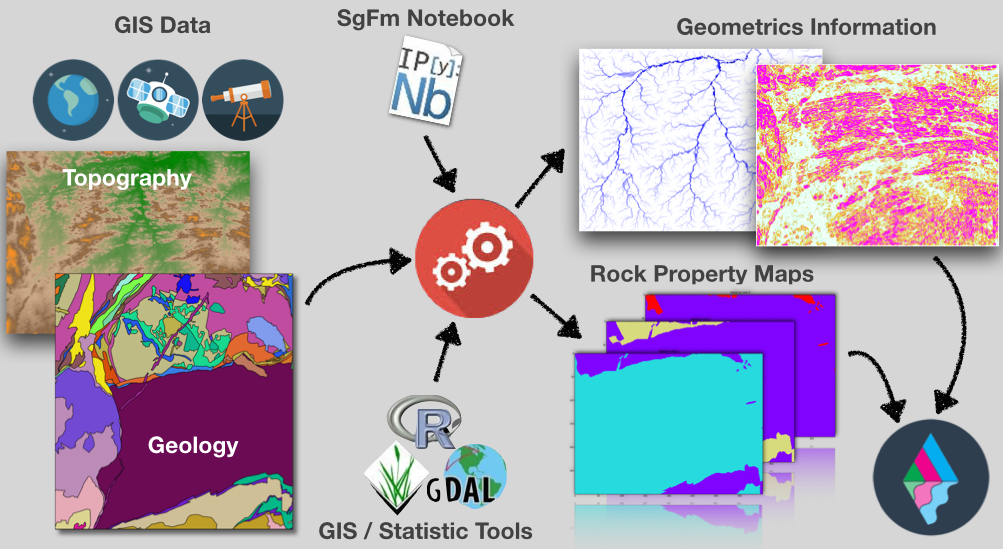
In cases where you need to provide to Lecode a detailed distribution of sediment repartition within the simulation area, you will need to get a series of shapefiles, ArcInfo binary coverages and/or geotiffs representation of the geological features. Usually you can search the web and specially Geological Survey repositories or Research Agencies providers for detail datasets of geological mapping.
Like for the previous notebooks, there is no magic here and you will need to understand how the dataset you are using have been built as well as the geological codes and specific informations related to the projection, the geological units... In many cases there are series of information and metadata files associated with the dataset you have downloaded and you will need to have a look through it to find what you are interested in.
The provided notebooks will help you to:
Extract information from the Geological dataset (mainly from shapefiles),
Apply a set of transformations to the Geological dataset (merge tiles, project dataset to UTM),
Clip your dataset to the area you want to simulate within Lecode,
Define the resolution of your simulation area as well as the initial geological layer,
Combine several geological units to specific sediment class used to defined material types in Lecode XmL input file, and
Defined some default sediment classes for specific regions in the simulated area.
The SGFMGeolGen_Basic.ipynb & SGFMGeolGen_Ocean.ipynb notebooks have been designed for the 2 commonly used geological datasets that we have been coming across when using Lecode.
SGFMGeolGen_Basic.ipynb is relevant for datasets using shapefiles which is usually the case when dealing with continental simulation. The notebook will assist in defining specific sediment classes for distinct geological units.
Follow the link below to have a look @ the IPython Notebook for shapefiles stratigraphy generation.
On the other hand, SGFMGeolGen_Ocean.ipynb will help in transforming ArcInfo binary coverages data to Geotiffs for each sediment class available and will combined them to create the initial deposit file required by Lecode.
Follow the link below to have a look @ the IPython Notebook for ArcInfo binary coverages stratigraphy generation.